Driver app
Drivers manage jobs, working time, odometer records, location and operation steps from the mobile app.
Try free for 3 daysNo credit card required.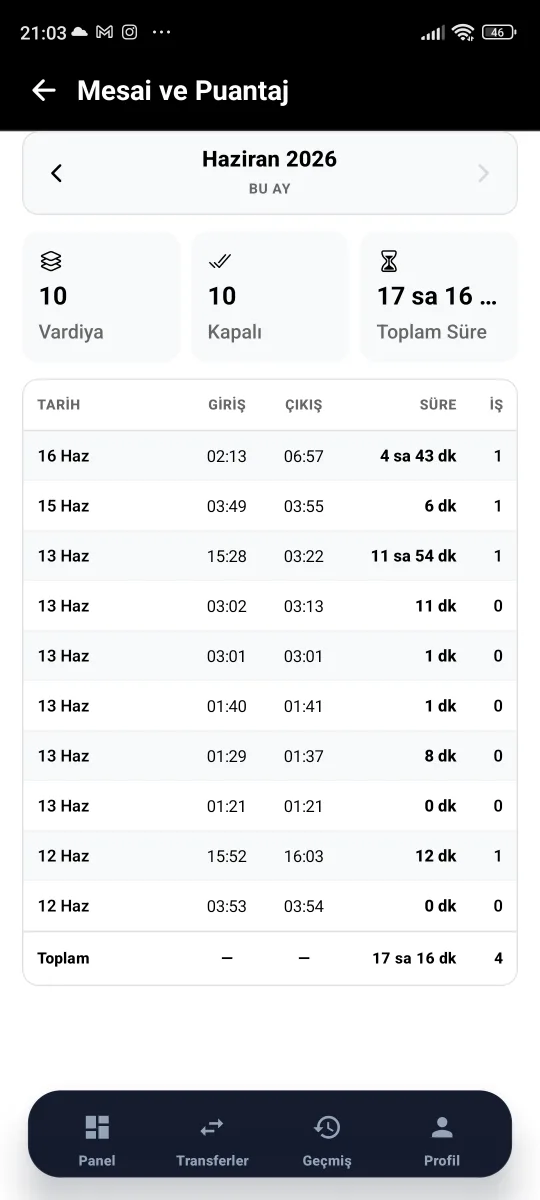
Jobs, working time and field updates in the driver’s pocket.
Drivers see their assigned jobs in the mobile app. They record working time and odometer readings and update transfer stages. Your operations team follows those changes in the shared workflow. Location sharing depends on device permissions and the app’s operating conditions.
What can you do with this module?
- Daily job list
- Working time and odometer
- En route and passenger picked up steps
- Location and status sharing
How does it work?
Prepare for the job
Check the active vehicle and working status. Assigned transfers appear in the job list.
Update field progress
Record stages such as departure and passenger pickup. Share job status with the operations team.
Keep working-time records
Follow shifts, attendance and odometer details. Review past records in the relevant mobile screens.
From the first job to the end of a shift
The driver starts a shift, checks the active vehicle and prepares for the assigned transfer. They update the app when the passenger is picked up. Working-time records remain available in attendance, while operations follows transfer progress.
PlatformCommon questions
Do drivers see every transfer?
The driver experience focuses on assigned jobs. Managing the complete operation and making assignments belongs in the dashboard.
What does location sharing require?
The appropriate device permissions, enabled location sharing and connectivity are needed. Update frequency can be affected by phone conditions.
Which other records are available?
The app includes screens for shifts, attendance and odometer records. Available functions depend on the user’s role and company settings.
Try it with your own operation.
Explore the dashboard, customer portal and driver app in one trial.